01
History, without the archaeology
See the whole story.
Follow branches, tags, and commits in a readable history graph. Find the change you need, then go straight to its diff.
A calmer home for your Git workflow.
Thoughtful diffs, clear history, and the final say on every commit.
macOS 14+ · Apple Silicon · Free & open source
TAKE A LOOK AROUND
THE MAC APP. NOT A MOCKUP.
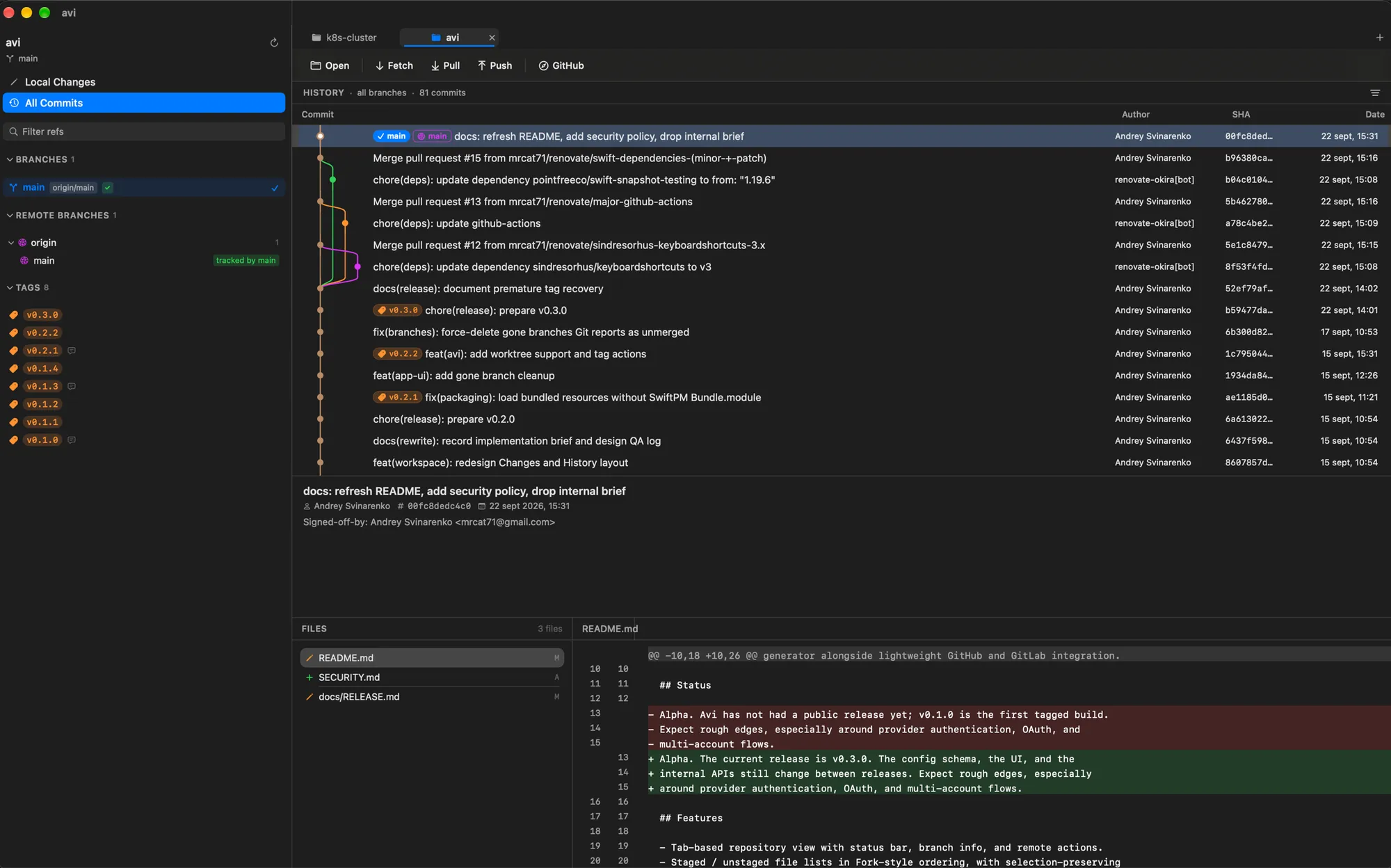
A guided look at a real screenshot. The app itself runs on your Mac.
LESS FRICTION. MORE CONTEXT.
Not another browser in a window. A native SwiftUI app that feels at home on your Mac, and stays close to your code.
History, without the archaeology
Follow branches, tags, and commits in a readable history graph. Find the change you need, then go straight to its diff.
A little more precision
Stage a file, a hunk, or just a few lines. Read unified or side-by-side diffs, then turn a working tree into thoughtful commits.
One native workspace
Move between repositories and linked worktrees. Keep GitHub and GitLab close, with pull and merge requests in your workflow.
GOOD TOGETHER. ON YOUR TERMS.
Claude Code, Codex, OpenCode, and other local agents can hand their finished work to Avi. You get the changes, a commit message, or a whole commit plan.
Nothing is committed or tagged until you approve it. The handoff is local. Optional AI features use the provider you configure.
Meet your new review loop# Work finished. Your review starts here.
$ avi propose -m
  "feat: make something good"
-- src/app.tsFROM YOUR AGENT TO YOUR REVIEW
Install Avi's skills for Claude Code, Codex, or OpenCode. Then let your agent bring the work to you.
Move Avi to Applications. In Avi, choose Agents > Install Agent Skills…, then click Install All in Settings > Agents. This installs the avi command and the agent skills.
Open the project in Avi once, so it is trusted for agent handoff. Keep ~/.local/bin on your terminal's PATH so your agent can find the command.
Give your agent a task and ask it to send the result to Avi. Review the files and proposed message, then approve the commit yourself.
“When you're done, send the changes to Avi for review. Do not commit or push.”
A SMALLER DISTANCE TO DONE
Open a local folder or clone from GitHub or GitLab. Your existing Git repositories stay yours.
Read the diff. Stage the lines that belong together. Write a message, or ask your configured AI to help.
Review each commit, then approve it. Push when you are ready, with the right branch and tags in view.
A FEW THINGS TO KNOW
Yes. Avi is free and open source under the MIT license. You can inspect the code, build it yourself, or contribute on GitHub.
Avi requires macOS 14 (Sonoma) or later and Apple Silicon. Download the disk image from GitHub Releases, open it, and drag Avi into Applications.
Avi is currently ad-hoc signed, not Apple-notarized. On macOS 15 or later, open System Settings > Privacy & Security and choose Open Anyway after the first launch attempt. On macOS 14, right-click Avi in Finder and choose Open. Only do this for a download you trust. See the installation notes.
No. Staging, diffs, history, and commits work without AI. Commit-message generation is optional and uses a command or API provider you configure. Agent handoff is also optional.
Avi is in alpha. The interface and configuration still change, and provider authentication and multi-account flows have rough edges. Check the release notes before updating. In-app updates are available through Sparkle.
A LITTLE CLARITY GOES A LONG WAY.
Native to your Mac. Close to your code.